Picture Lock doesn’t mean a project is finished, it simply means it’s ready to move into the next stage of post-production. Whether that next step is conform, online editing, colour grading, VFX, sound design or final delivery, the quality of the handover often determines how smoothly the rest of the pipeline will run.
Over the years I’ve realised that one of the biggest differences between a junior editor and a senior editor isn’t necessarily storytelling or technical ability. It’s how they organise and prepare a project for everyone who comes next. A good edit tells a story. A good project tells every department what they need to know.
One of the best habits I’ve developed is to imagine that someone I’ve never met will have to open my project tomorrow morning. They should immediately understand what’s happening, where everything lives and what still needs to be done without calling me or the producer. If that happens, then the handover has been successful.
Project organisation isn’t about being tidy or following rigid rules. It’s about reducing mistakes, avoiding unnecessary questions and making collaboration less stressful for everyone involved. Before handing over a project, I always compare the edit against the post-production tracker to make sure the sequence matches the latest approved version, that all client feedback has been implemented and that naming conventions and technical specifications follow the project’s agreed workflow. If the tracker says Version 12 is the approved Picture Lock, then Version 12 should be exactly what the next department receives. Any uncertainty at this stage almost always becomes a bigger problem later.
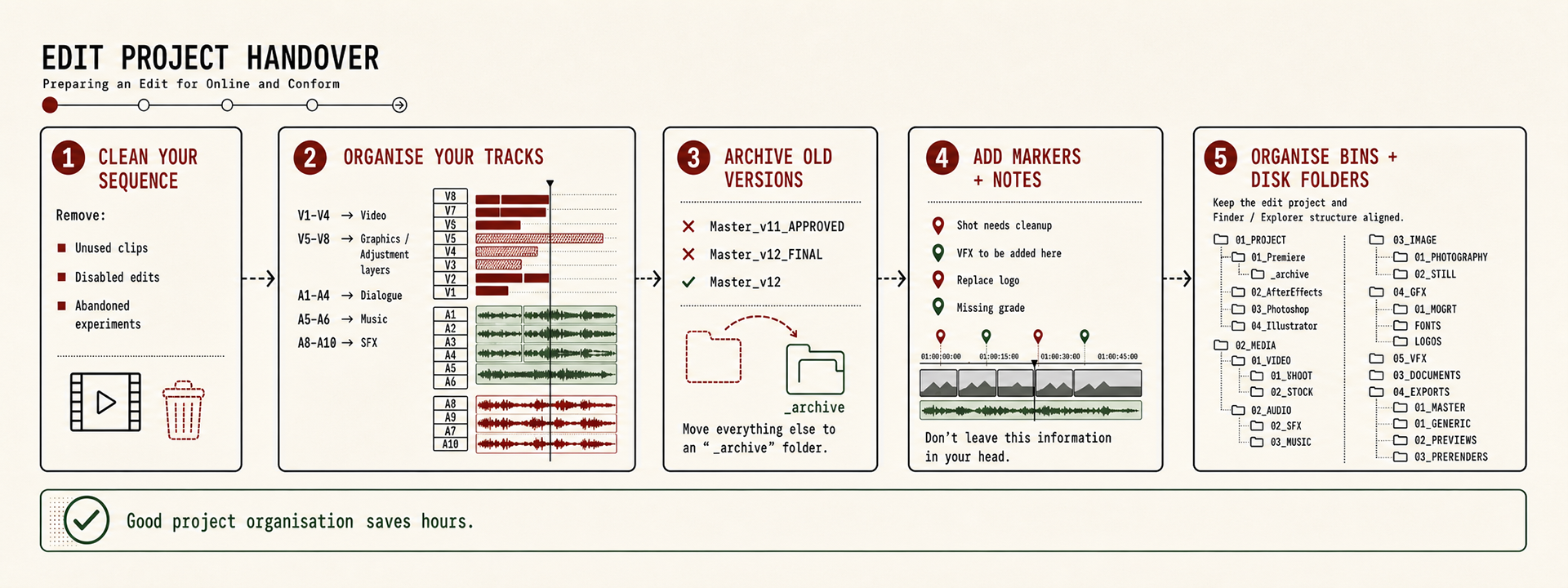
One principle I try to follow throughout every production is that information should never live inside someone’s head. Producers shouldn’t have to remember which shot still needs a clean-up, and editors shouldn’t rely on memory to explain unfinished work. That information should exist somewhere everyone can access, whether that’s inside the project itself, on the production tracker or in a review platform like Frame.io. If a VFX clean-up is still pending, I prefer adding a marker directly on the timeline describing exactly what’s required. If a graphic is temporary or a music track is waiting for licensing approval, I leave notes where the next editor will naturally find them. Clear communication is often more valuable than another perfectly organised folder.
The sequence itself also deserves attention before Picture Lock leaves the editing room. I prefer keeping a single active master sequence, something as simple as master-edit_v12, while older versions, experiments and alternative edits are moved into an "_archived" folder. Rather than adding labels like “Final”, “Approved” or “Latest” to filenames, I prefer using metadata, sequence colour labels or the production tracker to communicate status. The filename should describe what the sequence is, while the tracker describes where it sits in the approval process. This keeps naming consistent throughout the project and avoids filenames becoming longer with every client review, let's stop with the classic "edit_Final_Final_Final"
A clean timeline is equally important. By the time a project reaches conform, every clip should have a purpose. Disabled clips, hidden experiments, duplicate graphics, temporary adjustment layers and unused elements should all be removed unless there’s a genuine reason to keep them. I also try to organise the timeline logically, with footage on lower video tracks, graphics and composites above, and audio separated into dialogue, music, ambience and sound effects. The timeline shouldn’t require investigation, it should communicate its structure naturally.
Every production develops its own way of organising bins, and there isn’t a single correct solution. What’s important is consistency.
Throughout the years I’ve developed a structure that has worked well across documentaries, commercials and branded content. Sequences are separated by stage, from imported edits through offline, conform, grading and online versions. Media is organised by type, with dedicated folders for raw footage, proxies, stock media, voice-over, music, sound effects, graphics, VFX, animation and subtitles. Temporary assets and older versions always have a dedicated bin location instead of remaining mixed with active material. Other productions may use different structures, and that’s perfectly fine, as long as everyone on the project understands where to find things.
Throughout the years I’ve developed a structure that has worked well across documentaries, commercials and branded content. Sequences are separated by stage, from imported edits through offline, conform, grading and online versions. Media is organised by type, with dedicated folders for raw footage, proxies, stock media, voice-over, music, sound effects, graphics, VFX, animation and subtitles. Temporary assets and older versions always have a dedicated bin location instead of remaining mixed with active material. Other productions may use different structures, and that’s perfectly fine, as long as everyone on the project understands where to find things.
I try to apply exactly the same philosophy to the folder structure on disk. Whenever possible, the Finder or Explorer folders closely mirror the project organisation inside Premiere Pro, Resolve or whichever editing software is being used. Video, audio, graphics, VFX, exports and project files all have dedicated folder locations. Older media or obsolete versions are moved into archive folders instead of being deleted immediately. Keeping the project structure and the disk structure aligned makes transferring projects, relinking media, creating backups and archiving productions considerably easier.
Version control is another area where small habits make a big difference. Rather than embedding project status inside filenames, I prefer simple version numbering combined with production tracking. A project might evolve from Naming_v01 through Naming_v04_PictureLock, followed by Naming_v04_Online_v01 and Naming_v04_Online_v02 as finishing work progresses. The production tracker, not the filename, becomes the single source of truth for approvals, review status and client feedback. This avoids confusion and ensures everyone is looking at the same information.
Before sending a project to the Online Editor, Colourist or another editor, I always perform one final check and QC. I confirm that the latest approved sequence is the one being delivered, verify that all media is online, ensure fonts and graphics are available, remove obsolete assets, update the production tracker and leave any notes that might help the next person continue the work without interruption. These few minutes often save hours later in the pipeline.
Preparing a project for online and conform isn’t the most entertaining part of editing, but it’s one of the clearest signs of professionalism.
A well-organised handover allows every department to focus on their craft instead of solving avoidable problems. It creates trust between editors, producers and finishing teams, reduces stress across the production and ultimately helps deliver a better final film. In my experience, great editors don’t just create great edits, they manage projects that any professional can confidently pick up, understand and finish, and that can answer any question related to the edited assets coming from the client or the production team.
A well-organised handover allows every department to focus on their craft instead of solving avoidable problems. It creates trust between editors, producers and finishing teams, reduces stress across the production and ultimately helps deliver a better final film. In my experience, great editors don’t just create great edits, they manage projects that any professional can confidently pick up, understand and finish, and that can answer any question related to the edited assets coming from the client or the production team.