Most people outside post-production, and even many editors, think an Online Editor simply receives a picture-locked edit, exports a few files, waits for the colour grade or sound mix to come back, and does a couple of templated exports. In reality, the role is far more involved than that.
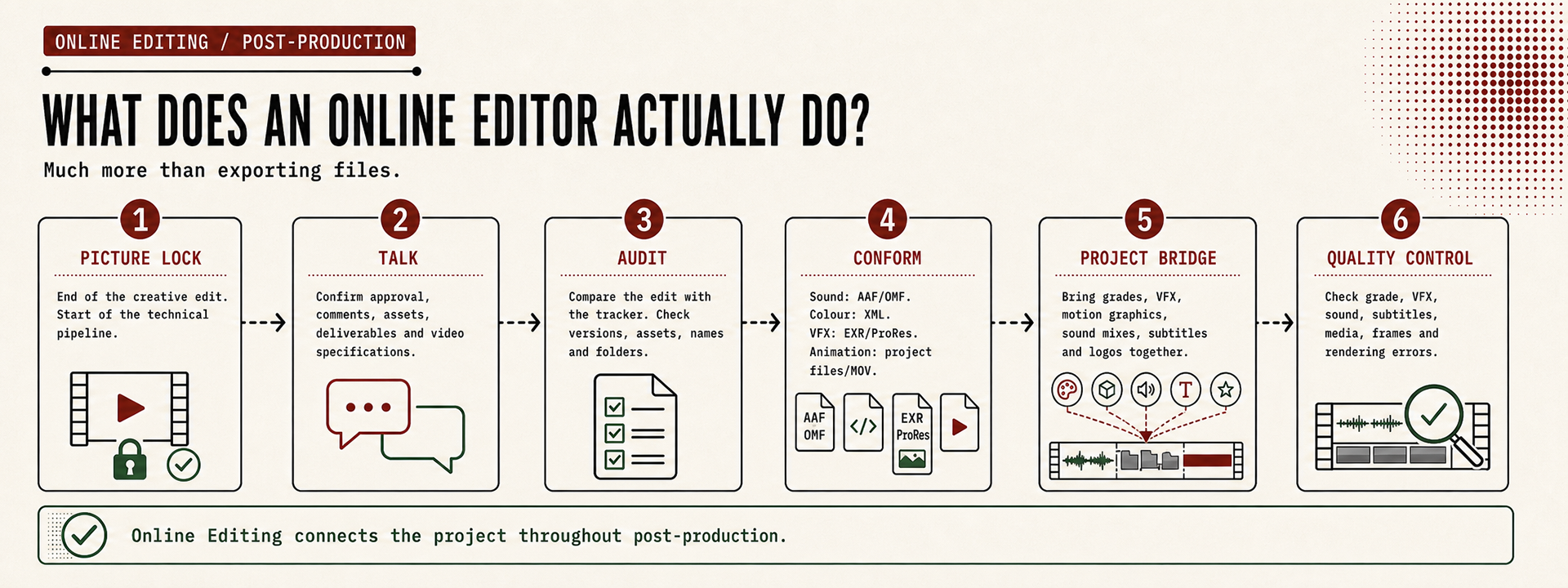
An Online Editor is responsible for taking the approved edit and guiding it through every technical stage of post-production until it's ready for delivery. They become the bridge between editorial, colour, sound, VFX, animation and mastering, making sure every department works from the same approved version and that nothing is lost along the way.
Ironically, when an Online Editor does their job well, very few people notice. The colourist opens the XML without issues. The sound mixer imports the AAF perfectly. The VFX team receives the correct source material. The final master is delivered without surprises. Most of the work happens quietly behind the scenes and that's exactly how it should be.
Although, I'll admit that I watch every export with a little anxiety, always wondering if I've forgotten something. And, more often than I'd like to admit, I do spot a glitch or something that isn't quite where it should be. Thankfully, that's exactly what Quality Control is for. It's much better that I find it than the client does.
Although, I'll admit that I watch every export with a little anxiety, always wondering if I've forgotten something. And, more often than I'd like to admit, I do spot a glitch or something that isn't quite where it should be. Thankfully, that's exactly what Quality Control is for. It's much better that I find it than the client does.
Why does the Online Editor exist?
Many editors think Picture Lock marks the end of the editing process. In reality, it's only the end of the creative edit.
Once the story has been approved, the project enters a new phase where several departments begin working simultaneously. Colourists start grading, sound designers build the sound-effects and final mix, VFX artists create and comp. shots, motion designers finish graphics and producers continue collecting feedback and coordinating deliveries.
Without someone overseeing this technical transition, it's very easy for departments to work from different versions of the edit, receive incomplete assets or spend valuable time solving problems that could have been avoided.
This is where the Online Editor becomes essential. Their responsibility is to protect the integrity of the edit while ensuring every department receives exactly what it needs.
This is where the Online Editor becomes essential. Their responsibility is to protect the integrity of the edit while ensuring every department receives exactly what it needs.
It starts with communication
Although the role is highly technical, I rarely begin by opening Premiere Pro or DaVinci Resolve.
I begin by talking to people.
Whenever possible, I like to have a short handover call with the Post Producer and, ideally, the key members of the post-production team. Before touching the project, I like to understand its current status. Has Picture Lock been fully approved? Are there outstanding client comments? Is every asset available? Have any deliverables changed?
These conversations often reveal far more than the project file itself. Good communication at this stage saves countless emails, unnecessary revisions and technical issues later in the process.
Understanding the project
Only after that briefing do I begin reviewing the project itself.
The first step is comparing the delivered edit against the post-production tracker. I verify that the project matches the approved version, that all expected assets have been delivered and that folder structures, sequence names and version numbers remain consistent throughout the project.
I'm not looking for creative problems anymore, I'm looking for technicalities and workflows. If something is missing, this is the best moment to discover it, not after the colour grade has started.
Preparing the project
If the offline editor has delivered a well-organised project, this stage can be completed fairly quickly. If not, it often becomes the most time-consuming part of the handover.
The project should be clean, easy to navigate and free from unnecessary clutter.
I recently wrote another article explaining how I prepare projects for Online and Conform, so I won't repeat those details here. The important point is that every hour spent organising the project usually saves several hours later in the pipeline.
Conforming for the next department
One of the Online Editor's most important technical responsibilities is preparing the project for the specialists who follow.
Although the word conform is often associated with colour grading, in reality the process happens several times throughout post-production, with each department requiring a different type of preparation.
For the sound team, this usually means exporting an AAF or OMF together with a reference edit so the mixer can rebuild the project while preserving the editorial decisions.
For colour grading, the process normally involves creating clean XMLs alongside reference exports containing timecode and clip names, allowing the colourist to reconnect the edit back to the original camera files without issues.
Preparing material for VFX often requires a different approach again. Depending on the workflow, this may involve XMLs, EXR image sequences or high-quality ProRes exports in the correct resolution, codec and colour space, accompanied by clear reference edits and a tracker showing exactly how each shot should look inside the final timeline.
Animation and motion graphics follow a similar principle. Whether sending XMLs or rendered reference movies, the goal is always the same: provide enough technical information for another department to continue the project without ambiguity.
Each conform has its own workflow, technical requirements and potential challenges. They're substantial topics on their own, and I'll explore each of them in separate articles.
Coordinating every department
This is probably the least visible part of an Online Editor's work, yet it's where much of the value lies. As different departments complete their work, everything begins returning to the Online Editor.
Graded shots arrive from the colourist.
Final VFX renders replace temporary edits without missing frames or wrong colour space.
Motion graphics and animations are updated.
The final sound mix is delivered.
Subtitles, logos and other finishing assets arrive from different suppliers.
Final VFX renders replace temporary edits without missing frames or wrong colour space.
Motion graphics and animations are updated.
The final sound mix is delivered.
Subtitles, logos and other finishing assets arrive from different suppliers.
The Online Editor becomes the central point where all these elements are brought back together. It's no longer just about editing, it's about quality assurance and coordination.
Every new delivery must be checked, integrated into the master timeline, compared against the approved edit and communicated back to the rest of the team. At this stage, the Online Editor becomes the technical bridge connecting every department involved in post-production.
Quality Control
Before anything is exported, there's one final responsibility that often receives far less attention than it deserves: Quality Control.
This isn't simply watching the programme one last time. It's a systematic process of verifying that every element of the project is exactly where it should be.
The correct VFX shots. The latest grade. The approved sound mix. Proper subtitles. Correct logos. No offline media. No missing frames. No flash frames. No unexpected rendering errors.
The correct VFX shots. The latest grade. The approved sound mix. Proper subtitles. Correct logos. No offline media. No missing frames. No flash frames. No unexpected rendering errors.
By the time the project reaches delivery, the audience should never notice the hundreds of technical decisions that made the final master possible. That's the purpose of Quality Control.
More than exporting files
People often associate Online Editing with exporting XMLs, AAFs or final masters.
Those tasks are certainly part of the role, but they represent only a small fraction of what an Online Editor actually does.
Those tasks are certainly part of the role, but they represent only a small fraction of what an Online Editor actually does.
At its core, Online Editing is about protecting the project as it moves through post-production. It's about coordinating departments, maintaining technical consistency, solving problems before they reach the client and ensuring that the creative work survives every stage of the pipeline exactly as it was intended.
In future articles, I'll explore each conform workflow in greater detail: from preparing projects for colour grading and sound design to VFX, animation and final delivery.
But before learning the individual workflows, it's worth understanding the role that connects them all. That's where Online Editing truly begins.
But before learning the individual workflows, it's worth understanding the role that connects them all. That's where Online Editing truly begins.