How I Built a No-Code Workflow Using Zapier and Google Drive, a philosophy of modern post-production.
One thing that people who’ve worked with me quickly discover is that I enjoy building systems almost as much as editing.
Throughout my career, I’ve created countless spreadsheets and trackers to help productions stay organised. Whether it’s managing VFX shots, monitoring edit versions or simply keeping everyone aligned, I’ve always believed that a good tracker is one of the most valuable tools in post-production.
The irony is that trackers themselves eventually become a lot of work.
The larger the production, the more time someone spends updating spreadsheets, checking folders, copying filenames, notifying departments and making sure everyone is looking at the latest information. None of those tasks are particularly difficult, but together they consume hours every week.
That made me wonder if some of that work could simply disappear by removing the repetitive administration that gets in the way of the creative process.
That made me wonder if some of that work could simply disappear by removing the repetitive administration that gets in the way of the creative process.
As AI and automation became increasingly accessible, I started experimenting with no-code tools. I don’t come from a programming background, so instead of writing software I wanted to see how far I could go using platforms like Zapier together with Google Drive and Google Sheets.
My first experiment focused on something familiar to almost every post-production team: VFX shot tracking.
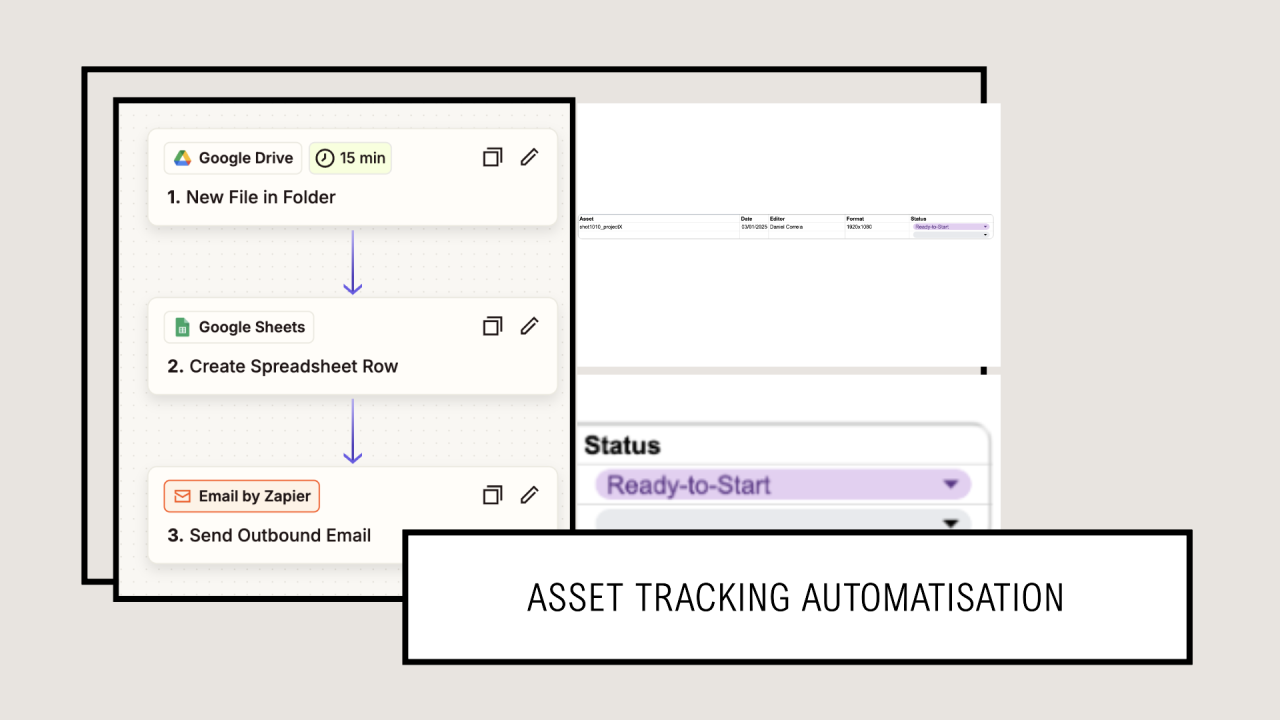
The idea was deliberately simple. Whenever an editor exports a correctly named shot into a Google Drive folder, an automation immediately detects the new file, extracts useful information such as the shot name, resolution, editor and file specifications, and creates a new entry inside a production tracker. From there, the same workflow can automatically notify the relevant people through Slack or email, meaning the entire team instantly knows a new shot is ready without anyone having to update a spreadsheet manually.
The idea was deliberately simple. Whenever an editor exports a correctly named shot into a Google Drive folder, an automation immediately detects the new file, extracts useful information such as the shot name, resolution, editor and file specifications, and creates a new entry inside a production tracker. From there, the same workflow can automatically notify the relevant people through Slack or email, meaning the entire team instantly knows a new shot is ready without anyone having to update a spreadsheet manually.
It might sound like a small improvement, but these are exactly the kinds of repetitive tasks that slowly accumulate during a production.
When dozens or even hundreds of shots move through different stages from editorial to VFX, client review, revisions and final delivery, every manual update becomes another opportunity for mistakes, duplicated work or outdated information.
When dozens or even hundreds of shots move through different stages from editorial to VFX, client review, revisions and final delivery, every manual update becomes another opportunity for mistakes, duplicated work or outdated information.
Good tracking isn’t really about spreadsheets.
It’s about visibility.
A post-producer needs to know where every shot lives, who is responsible for it, which version is currently under review, what feedback has been received and what still needs attention. Editors need confidence that they’re working with the latest assets. Supervisors need accurate progress updates without constantly asking for status reports.
The better the information flows, the smoother the production becomes. That’s why I think automation has so much potential in post-production. Not because it replaces experienced coordinators or post-producers, but because it allows them to spend less time maintaining information and more time making decisions.
And once you start thinking this way, the possibilities expand quickly.
And once you start thinking this way, the possibilities expand quickly.
If a system can automatically register a new VFX shot, why couldn’t it also monitor asset deliveries? Or update review statuses after client feedback? Or generate daily production reports? Or warn the team when media is missing, a deadline is approaching or a delivery package is incomplete?
Suddenly we’re no longer talking about one automation. We’re building an intelligent production workflow.
This experiment is still evolving, but it has completely changed the way I think about managing post-production. The goal is no longer to build better spreadsheets. The goal is to create automated workflows where information updates itself as much as possible, allowing the post team to focus on the work that actually requires human experience, judgement and creativity.
I don’t believe AI or automation will fully replace post-producers or editors any time soon. But I do believe they’ll become powerful assistants that quietly handle many of the repetitive tasks happening in the background every day.
For me, that’s where the real opportunity lies.